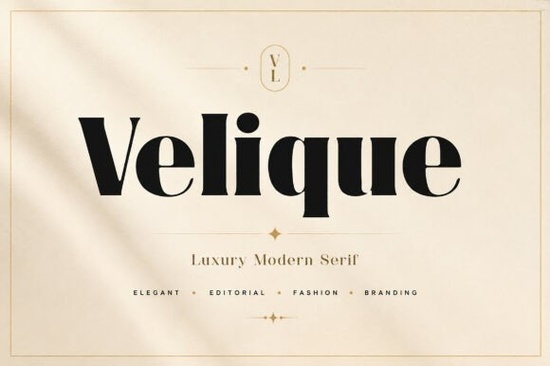
If you are designing high-end branding, fashion lookbooks, or luxury packaging, a well-chosen serif typeface can define the whole project. Velique is a sophisticated luxury serif font that brings a modern‑classic feel to any design. Its bold high‑contrast strokes, graceful curves, and refined proportions make it a strong pick for designers who need a memorable yet elegant typographic voice.
In this article, I will walk you through what makes Velique special, who benefits most from using it, and how it stacks up against other popular serif fonts available on Creative Fabrica. Whether you create wedding invitations, perfume packaging, or social media templates, understanding this font’s strengths will help you decide if it is the right tool for your next project.
What makes Velique a go‑to serif for luxury branding?
Velique stands out because of its carefully balanced letterforms. The bold vertical strokes are noticeably heavier than the thin hairlines, creating a striking high‑contrast look that catches attention without feeling harsh. The serifs are crisp and slightly flared, while the rounded terminals on letters like a and c soften the overall impression. This combination makes the font feel both authoritative and welcoming – perfect for a luxury brand that wants to appear confident but approachable.
Unlike many decorative serifs, Velique keeps its personality on a tight leash. The spacing is even, and the proportions are classic enough to work as a logo font or as a long headline without becoming tiresome. Small details like the distinctive tail on the uppercase Q and the elegant crossbar on the t add subtle character that helps your designs stand out from a sea of generic Didone‑style fonts.
Who tends to use Velique in real projects?
Print‑on‑demand sellers often pick Velique for t‑shirt mockups, mugs, and tote bags because the font reads well at a distance and adds a premium feel that shoppers associate with boutique brands. Small business owners creating their own product labels, candle packaging, or skincare boxes appreciate that the font looks expensive without the need for advanced design tweaks. If you run a stationery shop, wedding invitation designers are drawn to Velique’s romantic but clean silhouette, which pairs beautifully with modern calligraphy or a simple sans‑serif like Montserrat.
Crafters who use cutting machines find that the thick‑thin contrast translates well to vinyl and paper projects, even when cut at average sizes. Because the shapes are clean, you will not lose the fine details during a typical Cricut or Silhouette cut – something that can be tricky with ultra‑delicate serif fonts.
How does Velique compare to other luxury serif fonts?
If you are already browsing Creative Fabrica for serif fonts, you have probably noticed a few alternatives with a similar high‑end vibe. Knowing how Velique sits alongside them will help you pick the right one for your specific project.
For a softer, more romantic mood, Santhie is a lovely option. Where Velique feels bold and editorial, Santhie leans into delicate, almost handwritten curves that work beautifully on wedding invitation suites and feminine branding. It keeps a high‑contrast structure but with a lighter, airier touch.
If you need a whole family with multiple weights, the Almero Serif Family gives you more flexibility. While Velique sticks to a single striking display weight, the Almero Serif Family includes regular, italic, and bold variations that can be mixed for hierarchy in long‑form editorial design. It is a practical choice when you need to typeset both headlines and body copy in the same font family.
Designers who favour a clean, understated elegance often try Lyte Serif. It shares Velique’s modern‑classic DNA but with less contrast and a more neutral personality. The Lyte Serif typeface fits easily into minimalist packaging, corporate identity, and magazines where type should support the visuals without shouting.
Another interesting choice is Giteral, a serif with sharp, chiselled edges that exude a slightly edgier luxury. Compared to Velique’s smooth, rounded details, Giteral feels more geometric and modern, making it a solid pick for fashion‑forward tech brands or architecture studios that want a high‑contrast look with an industrial slant.
Where does Velique work best?
You can confidently use Velique for:
- Luxury brand logos and monograms
- Fashion magazine headlines and editorial spreads
- Perfume, wine, and skincare packaging labels
- Wedding invitations, save‑the‑date cards, and signage
- Social media graphics for boutique hotels and event planners
- POD products like tote bags, pillows, and wall art
- Hero text on upmarket e‑commerce websites
The font includes standard OpenType features, so you can access alternate characters and ligatures in supported software. It works in Adobe Illustrator, Photoshop, InDesign, Affinity suite, Canva (via uploaded fonts), and any program that allows custom OTF/TTF installation.
What file formats does Velique come with?
When you download Velique, you typically receive OTF and TTF files, so it works on both Windows and MacOS without extra setup. The OTF version often includes extended character support, ligatures, and alternates if the designer has added them. Some sellers also bundle web font files (WOFF) for use in website design – useful if you plan to maintain a consistent brand appearance online. Always check the specific listing to see what is included, but for most crafters and print designers, OTF and TTF are all you need.
A quick checklist before you start using Velique
- Download and install both OTF and TTF files, testing the OTF first in your design software.
- Open the glyphs panel to check for alternate characters, ligatures, and stylistic sets that can add variety to your project.
- Pair Velique with a clean sans‑serif (like Work Sans or Inter) for web and modern branding, or with a classic serif for traditional print pieces.
- Test the font at small sizes if it will appear on business cards or small labels – the fine hairlines can disappear so increase tracking slightly if needed.
- Verify the license terms for your use: a standard desktop license is usually fine for physical products, but for digital use or embedding, check the details.
Once you have done these steps, you are ready to give your next luxury project the elegant, editorial typographic treatment it deserves.
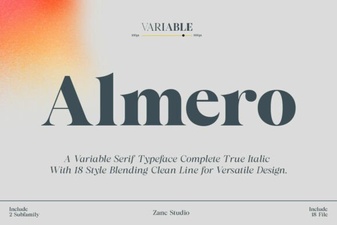 Almero Serif Font Family: Elegant Typography for Web & Print
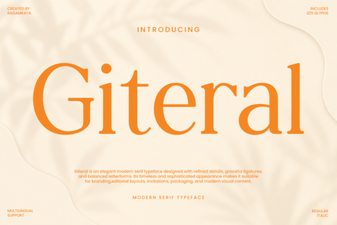 Giteral Font: Fresh Typography for Designers
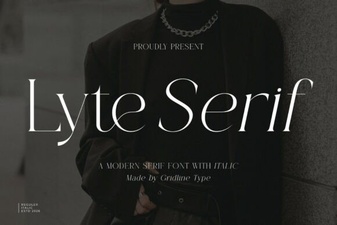 Discover Lyte Serif Font for Clean, Modern Typography
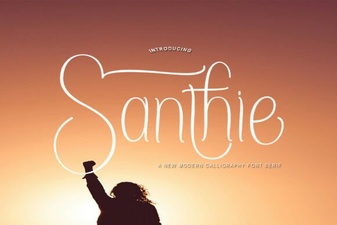 Santhie Font: Modern Typography for Web & Print
 Distress Vintage Font: Creative Projects & Design Inspiration
 Texas Bold Font: Creative Uses and Design Inspiration